
Adobe Illustrator Gradient Improvements
April 14, 2025, 1:45 p.m.
Below, you can find a list of what Manpreet has worked on in March 2025. Gradients were the primary focus of development this month. For more details, please see MR !105.
Color Stop Operator (Bs)
colorSpec colorType midpoint ramppoint Bs
- Added support for CMYK type (
type=0) in colortype=5 spec. - Refactored the parsing of color stops.
- Fixed a bug where incorrect color and type values were parsed.
Gradient Geometry Operator (Bg)
[flag] name xOrigin yOrigin angle length a b c d tx ty [aspect_ratio] Bg
- Added support for aspect ratio in radial gradients.
- Added additional
is_stringtype information to all operators to resolve ambiguous parsing cases. If eitherflagoraspect_ratiois missing, it is determined based on the index ofname, which is a string.
Gradient Begin Operator (Bb)
[idx] Bb # idx=0 for fill, idx=1 for stroke
- Added support for fill and stroke gradient instance types based on
idx.
Gradient Instances
Support for three different gradient instance definitions has been added:
- Gradient instance with path-render operator
# -- path definition --
Bb                                            # Gradient begin operator
1 (gradient name) 0 0 0 1 1 0 0 1 0 0 1 Bg    # Gradient Geometry operator
# -- other gradient operators --
f                                             # Path render operator
0 BB                                          # Gradient end operator
- Gradient instance in known styles
/FillStyle :
# -- fill style operators --
Bb                                            # Gradient begin operator
2 (gradient name) 0 0 0 1 1 0 0 1 0 0 1 Bg    # Gradient Geometry operator (gradient transformation is always `1 0 0 1 0 0`)
# -- other gradient operators --
0 BB                                          # Gradient end operator
# -- more fill style operators --
# -- object definition --
Bb                                            # Gradient begin operator
1 (gradient name) 0 0 0 1 1 0 0 1 0 0 1 Bg    # Gradient Geometry operator (gradient transformation is always `1 0 0 1 0 0`)
# -- other gradient operators --
0 BB                                          # Gradient end operator
# -- other styles --
6 () XW                                       # Apply known style operator (known style name is never set)
Linear Gradients
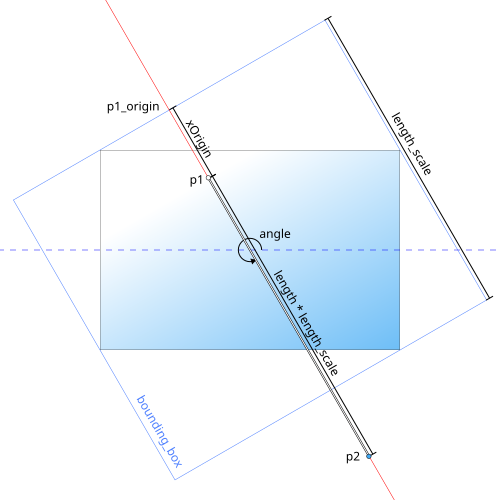
- For linear gradients the following input values are obtained from the Illustrator file:
xOrigin,yOrigin,angle,lengthandtransform matrix(a, b, c, d, tx, ty) from the Gradient Geometry (Bg) operator.
- The
transform matrixrepresents the transformation applied to the object after the gradient was applied. This transformation must be (temporarily) removed from the object before performing any further computations. - A bounding box is computed as if the shape were rotated by
-angle, then the box is rotated byangle; this is referred to asbbox. - The first intersection point of the gradient line and the
bboxisp1_origin. xOriginis the distance betweenp1_originandp1of the gradient at the given angle.yOriginis always zero, because for linear gradients moving perpendicular to theanglehas no effect.lengthdefines the distance betweenp1andp2of the gradient (a length of 1 covers the entire shape at the given angle).angleis applied as a gradient transformation at the end.
Radial Gradients
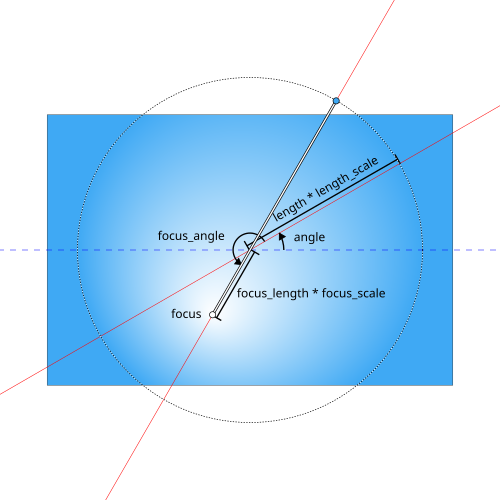
- For radial gradients the following input values are obtained from the Illustrator file:
xOrigin,yOrigin,angle,length,transform matrix(a, b, c, d, tx, ty) andaspect_ratiofrom the Gradient Geometry (Bg) operator.xHighlight,yHighlight,focus_lengthandfocus_anglefrom the Gradient Hilights (Bh) operator.
- Define a scaling function for the gradient radius and focus point as follows:
scale_function(x, y, w, h) = sqrt(w^2 * (x - 0.5)^2 + h^2 * (y - 0.5)^2) * sqrt(0.5)
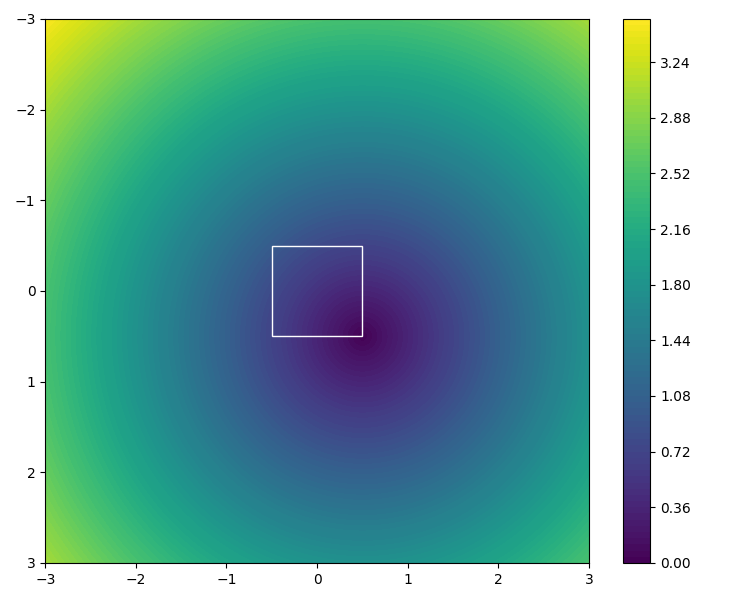
Visualization of the scale_function function for a 1x1 unit square, with varying x and y. (xOrigin * shape_width, yOrigin * shape_height)defines the origin of the radial gradient relative to the center of the shape.- The radius is
length * length_scalewherelength_scale = scale_function(xOrigin, yOrigin, shape_width, shape_height) - The focus point is
(xHighlight * focus_scale, yHighlight * focus_scale)wherefocus_scale = scale_function(0, 0, shape_width, shape_height). - Instead of using
xHighlightandyHighlightdirectly, they are calculated fromfocus_lengthandfocus_angleto ensure maximum compatibility with Illustrator. angleandaspect_ratioare applied as gradient transformations at the end.
Other Changes
- The
Bm,Bc, andXmgradient operators are ignored as they are not needed. - Added a post-processing step to remove unused gradients from the generated SVG and performance improvements for the same.
- Fixed a bug where tint values were incorrectly parsed as integers instead of floats in
FillGenericCustomColorOperator.
A special thanks to Jonathan for his invaluable help throughout this project, and a huge thanks to Martin for always making sure our blog posts look sharp. And as always, a heartfelt thank you to the entire Inkscape community!
